
Notebook Review
ASUS ExpertBook Y1411CDA Review: Focused on Everyday Work
Editor's note: This is an original English adaptation based on the Notebook-Center.ru review published on February 07, 2022, rewritten for Notebook Center's English overview archive.
Overview
ASUS built the ExpertBook Y1411CDA around a simple promise: give office users the essentials at a price that stays accessible. In the reviewed configuration that means a Ryzen 3 3250U, 8 GB of RAM, a 256 GB SSD, and a matte Full HD IPS display for roughly $550. There is nothing flashy here, but the specification sheet shows a clear attempt to prioritize usability over marketing noise.
Technical Specifications
| Processor | AMD Ryzen 3 3250U 2600 MHz |
|---|---|
| Memory | 8 GB DDR4 2400 MHz |
| Storage | 256 GB SSD |
| Display | 14" 1920x1080 Full HD LED IPS, matte |
| Graphics | AMD Radeon RX Vega 3 |
| Optical drive | none |
| Wireless | Wi-Fi 802.11 b/g/n/ac, Bluetooth 4.2 |
| Audio | SonicMaster, 2 speakers |
| Ports | 2xUSB 2.0, USB 3.2, USB Type-C, HDMI, SD card reader microSD, combined audio jack |
| Extras | 720p webcam |
| Battery | 2-cell Li-ion 32 Wh |
| Size and weight | 325x216x23 mm, 1.6 kg |
| OS | DOS |
| Configuration | ASUS ExpertBook Y1411CDA-EB886 (90NB0T32-M11870) |
Design and Usability
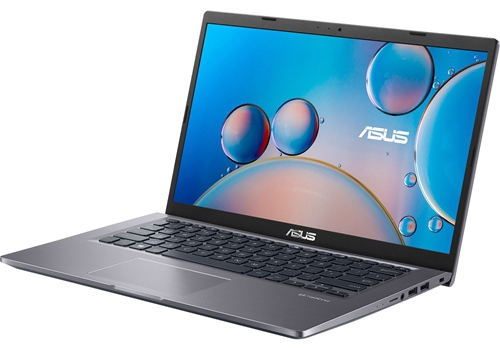
The design stays close to what business users usually want. The chassis is straightforward, reasonably compact for a 14-inch notebook, and light enough at 1.6 kg to remain easy to carry between workspaces. ASUS does not turn the Y1411CDA into a premium object, yet the overall impression is functional rather than cheap.
Display and Everyday Experience
A matte IPS display is a strong decision in this tier. It gives the notebook a more comfortable everyday viewing experience than budget TN panels, and Full HD resolution is exactly what most users need for documents, browser work, and video calls. Audio and webcam hardware remain ordinary, which is acceptable because this is primarily a work-first notebook.
Performance
The Ryzen 3 platform sets the limits clearly. It is suitable for office suites, browser sessions, remote work tools, and light multitasking, but it does not turn the Y1411CDA into a machine for heavy creative or technical workloads. The 256 GB SSD is enough to get started, although storage-conscious buyers will need to manage files more carefully than on larger-capacity rivals.
Ports and Battery
ASUS includes a practical spread of connections, including USB-C, HDMI, and microSD. That matters in real work settings where notebooks still need to handle projectors, older peripherals, and quick file transfers without a bag full of dongles. Battery capacity is modest at 32 Wh, so the machine works best when portability matters, but not at the expense of access to a charger.
Verdict
The ExpertBook Y1411CDA makes sense because it knows its audience. It is for buyers who need a sensible office notebook with a decent screen, enough ports, and no unnecessary drama. Performance is modest, but for everyday work it remains a balanced and understandable package.